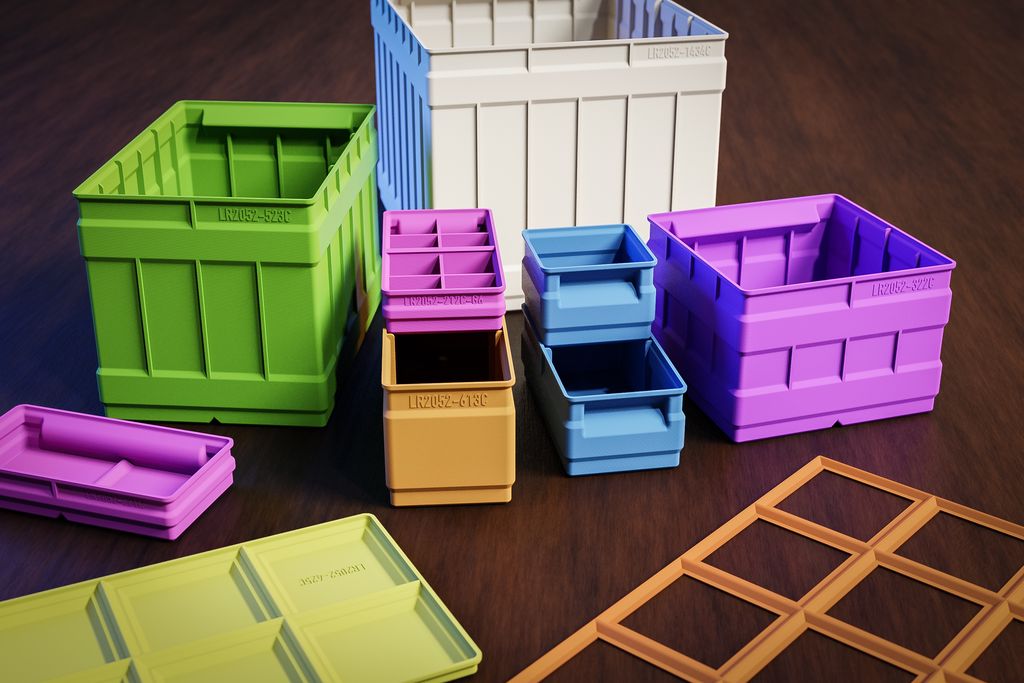
Today I release a huge update of my storage boxes system for 3d-print. This update not only further improves the geometries of the models, but also extend the available sizes and variants. There are now 1000+ model files in the full set you can buy in the shop.
As a buyer of one of the sets, you received an email with all these details and links where you can download the updated set. If you didn’t receive this email, please let me know.
Extension of Model Sizes
It took me a while, but now all variants of the storage boxes come with a consistent size range from 1x1 up to 6x6 units. The split storage boxes go up to 9x9 units. All grids and lids also got extended up to 6x6 unit sizes.
There are no omissions anymore, for each size there is e.g. a 1x2 and 2x1 variant. These variants have the same size, but the label position is swapped.
In some cases, there is some redundancy. For some boxes with a grid, smaller sizes are identical to boxes without a grid. I kept these files in place, to make the catalogue more consistent.
Geometry Changes for Improved Print
I further optimized the geometry of all boxes to make them print faster and more reliable. From your feedback, I found and verified certain areas of the models, where slicing didn’t produce an optimal result. All these issues are now fixed. Also, the geometry between the boxes and sizes is now more consistent.
All boxes of revision C are still perfectly compatible with the boxes from revisions A and B. If you rely on very precisely adapted insets, I advise you to make a test print and check if the inset is still working.
For best slicing results, I recommend using Prusa Slicer (if you can).
All model files are now stored in the 3MF format. This format is superior to the STL format with better geometry and smaller file size. For your convenience, I also added an STL version for each model.
If your slicer supports 3MF, I recommend using the new format.
Adding a JPEG Preview for Each Model
In order to simplify finding a model, I added a JPEG file with the same name as the model.
More Height Variants
There are three new height variants: Extended (600C), Triple (500C) and Quad (1400C). All of these new variants are perfectly compatible with all other heights. There are now the following heights:
| Series | Name | Height Units | Stacking Height |
|---|
| 200C | Flat | 0.5 | 20 mm |
| 100C | Regular | 1 | 40 mm |
| 600C | Extended | 1.5 | 60 mm |
| 300C | Tall | 2 | 80 mm |
| 500C | Triple | 3 | 120 mm |
| 1400C | Quad | 4 | 160 mm |
Changes in the Part Numbering Scheme
With all the new sizes there would have been a conflict with the part numbers. Therefore I simplified the part numbering scheme but tried to keep most part numbers identical. There are changes for the lids and grids, which have now their own number range. The part numbering scheme is:
LR2052-[series][width][depth][revision]-[variant][number]
| LR2052- | This is the product number, which also shows you the compatibility between the boxes. All boxes starting with the same product number are compatible with each other. |
|---|
| [series] | This is a one or two-digit number, which specifies the kind of storage box or element. Lids are now series “4” and grids series “7”. |
| [width] | This is a single digit with the width of the box in units. The width is the dimension along with the label. The package uses zero as an indicator. |
| [depth] | This is a single digit with the depth of the box in units. The depth is perpendicular to the label. The package uses zero as an indicator. |
| [revision] | This is a letter, starting from “A”. If the geometry of a model changes, I assign a new letter. I assigned a new revision “C” for all models in this update |
| [variant][number] | Optional, boxes can have variants. Currently, I use variants “-G1”, “-G2” up to “-G6” for different grids inside of the boxes. Also, I use “-S” for split boxes, where the models for one split box are numbered “-S1”, “-S2”… |
Consistent Divider System and More Dividers
In this update, I extended the number of boxes with integrated dividers (I call them “grids”). The regular set comes now with three divider variants, and all flat boxes have six divider variants. I also added three divider variants to the tall boxes.
The photos of your drawers, desks and shelves with the storage boxes and how you use them was really helpful. It was the reason why I added more of these divided boxes, even I personally do not think they are useful (for me). It seems you like to keep similar things in one divided box. So here they are. 😄
Discontinued Regular, Flat and Tall Packages
Only a few people bought the single series packages. Therefore I removed these from the shop. Creating all these small packages was time-consuming, now I can focus on one single package.
Free Models moved to Prusa Printers
I moved all free models to Prusa Printers. There you can easily examine it in the 3d-viewer and download them individually.
Download or Buy the Models
Conclusion
I hope you find this update of the storage boxes system useful. As usual, please let me know if you find any problems. Yet, I am also interested to see your successful prints and how you use them. This will help me further improve the system.
Have a great day and happy printing!