published: July 13, 2019 —
last modified: October 23, 2025
In my opinion, preprocessor macros and the outdated #include mechanism are one of the worst parts of the C++ language. It is not just these things are causing a lot of problems, even more, it is very time consuming to find them.
While I usually focus on *embedded development *on this blog, this topic especially aplies to desktop software. It is valid not only for C++, but also C programs.
As usual, I try to cover the topic in detail to bridge any knowledge gaps you may have.
What is the Problem with Macro Header Guards?
Macro based header guards can lead to unexpected problems. In the following sections, I will explain the core concepts and demonstrate the problem using a simple example.
Compiling Units
In C and C++ a compile unit usually consists of a header (.h or .hpp) and implementation file (.c or .cpp). It is the lowest level of encapsulation. The header file contains the interface of the unit, while the cpp or c file contains the implementation.
The idea behind this concept is to allow “hiding” or encapsulating implementation details in a file. After the unit is compiled, you get an object file .o or with several ones a complete library.
The user of the compiling unit or library does not have to know the code of the implementation file and uses the header to access the interface for it.
The Stream Example
The following example is a minimal program with two compile units. For the Stream class header, old-style header guards are used.
Most software developers use comfortable IDE and therefore have normally no contact with the actual invocation of the compiler commands. If the stream example is compiled using the GNU compiler, the following commands are executed:
c++ -o Stream.o Stream.cpp
c++ -o main.o main.cpp
c++ -o myApp Stream.o main.o
First, the unit Stream.cpp is compiled into Stream.o. Next, the unit main.cpp is compiled into main.o, and eventually the two compiled .o units are linked into the final application.
Please note, these processes are a simplification, so you can follow the topic more easily. It basically works in the shown way. Modern compiler introduces features like precompiled headers or link-time code generation which blur the borders between the processes a little bit.
The Preprocessor
If a unit is compiled, the code of the unit is processed by the preprocessor. It will include all the required files. resolve defined macros and put everything in one single file for the actual compiler.
Compilers usually support an option where you can get the immediate output of the preprocessor, without actually compiling the unit.
c++ -E -o main-pre.cpp main.cpp
For the main unit, this will generate a file like the following one:
The preprocessor marked all processed and included files with # comment lines. As you can see, the macro header guard is gone, because all these preprocessor statements were resolved.
First, it started with the main.cpp file then found the #include "Stream.hpp" which it included at this point. Afterwards, it continued the with the rest of the main.cpp file.
It is a very simple example and therefore easy to read and understand. If you are working with libraries which are using hundreds of included files, the preprocessor result can be overwhelming long and hard to read.
Still, this is more or less what the compiler will process, in exact this order. Even modern compiler do not exactly process the files in this way, creating an immediate preprocessor file can help if you are searching for compilation issues.
Why is a Header Guard Required?
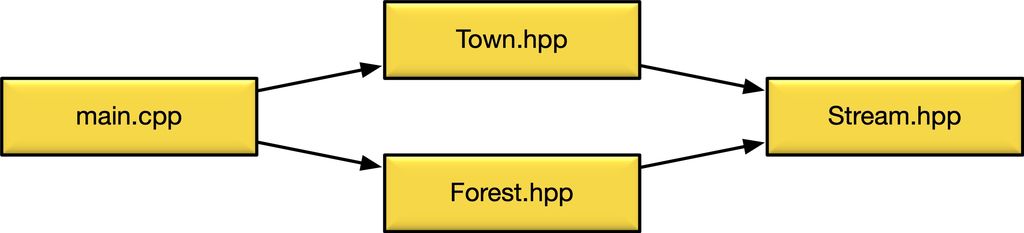
The guard is required to prevent a header file included twice in the same compiling unit. Have a look at the following dependency graph:
From the file main.cpp the two header files Town.hpp and Forest.hpp are included. Both files include Stream.hpp.
For the preprocessor, the includes look as shown above. As you can see, the file Stream.hpp is included twice.
If the preprocessor creates the compile unit, without header guards, the result will look as shown in the following example:
As you can see, the declaration class Stream is made twice, which will generate an error. The compiler does not know the reason for the second declaration and has no choice to stop at this point.
A header guard will detect the header Stream.hpp was already included before and omit its contents for the second #include.
Using a Library
The example program is working fine, and for the next iteration, we like to replace the ⟨iostream⟩ of the standard library with the advanced text stream library magic_text_stream. An inexperienced software developer developed it, and it looks like this:
We assume for the example, the library comes precompiled, and we get a static library and the header files installed on the system.
Adding the Library to the Project
To add the new magic_text_stream library to our project, we include the header in our implementation file. The library uses a namespace, and the class ConsoleStream also does not conflict with our Stream class. Therefore everything seems fine if we replace ⟨iostream⟩ as shown below:
If we try to compile our project, we get a really strange error:
In file included from Stream.cpp:3:
magic_text_stream/ConsoleStream.hpp:10:22: error: use of undeclared identifier 'std'
    void write(const std::string &text) override;
So, the identifier std is not declared? We see ConsoleStream.hpp includes Stream.hpp, which correctly includes ⟨string⟩, therefore the namespace std should be known.
As you already noticed, the error is caused because the library and the application both using the STREAM_H macro as header guard.
Mistakes were Made
Clearly, mistakes were made. The library author should have used a header guard macro, as shown below:
Also, the author of the application should prefix the header guards with the application name.
While fixing the problem is relatively simple, many beginners are entirely lost with this kind of compilation errors. The displayed error is completely unrelated to the actual problem. Without experience, it is hard to find and will waste hours or even days.
A Long List of Potential Problems
Using macro header guards has the potential of a long list of problems. While reviewing code, I found all of the described ones at least once.
Other than problems in the code itself, there is no compiler warning about a macro header guard which does not match the filename and namespace.
Below, the top four problems with macro header guards.
1. The name of the header guard lacks a prefix with the name of the library or namespace.
Using #pragma once will delegate the task, of detecting subsequent #include statements for the same file, to the compiler. It can do this efficiently and safely. As a user, there is no room for mistakes. Just place the directive in the first line of every header file.
Stream.hpp
#pragma once
classStream{public:voidflow();};
There is no unique name you have to write correctly and no #endif which must exist at the end of the file. Also, if you change the name of the file or class, no changes are required.
Why is this not Part of the C++ Standard?
All #pragma statements are meant to be compiler-specific instructions which are per definition not portable. Therefore using #pragma once is not guaranteed to be implemented by a compiler and also, there is no standardised way how duplicate includes are detected.
Detecting duplicate includes is not always as simple as it seems: If a project uses symlinks to include libraries, the same header file may be accessed using two different absolute paths. Also, compiling has not necessarily be done on the same computer; it can be split up to many processes and executed on different servers on the network.
For these reasons, the first accepted proposal for a #pragma once replacement was not made until 2016 with the number P0538R0. It suggests the new preprocessor directives #once and #forget as a qualified replacement.
Also, C++20 will most likely include a new concept of modules, which will solve the current problems with included header files.
At the time I write this it is the year 2019, and there are still compiler which do not fully implement the C++11 standard, which is eight years old. So, do not expect to have modules or the #once statement until 2028.
Pragma Once Support Today
The #pragma once statement is supported by almost all compiler suites, even most for embedded development. You can safely use it and expect it will work with any compiler.
A Wikipedia page will give you a list of compiler and their support of the statement.
Conclusion
I recommend using #pragma once instead of old macro-based header guards. It will reduce the number of preprocessor macros and prevent potential and hard to find compilation problems. You should also replace existing macro-based header guards with this statement if you do maintenance work on existing code.
The statement is supported by all relevant compiler suites in a very efficient and safe way. While there may be rare problem cases, in distributed compiling environments, this will affect just a few users who are well aware of this.
I hope this article gave you some motivation to get rid of your old macro-based header guards. If you are not sure if #pragma once will work for your project, replace the old guards using a script and try to compile it.
If you have questions, miss some information or have any feedback, feel free to add a comment below.
I've released Pattern Generator v2.0.4 with a rewritten 64-bit fixed-point backend, a new shape browser, extra placement algorithms, adjustable canvas shapes, faster style previews and improved file handling. It's free for macOS and Windows — read the full post to see examples, download links and details.
Posted on 2020-11-21— 3D Printing, Common, Projects
I've been reorganising my lab and designed stackable organiser boxes optimised for fast 3D printing. They use a 60×60mm raster, stabilising walls, dual label slots and rail grids. I offer a free STL subset and explain print settings—read the full post for downloads and the complete shop set.
In Part 6 I walk you through the input panel for my 3D-printed pet feeder: the rotary encoder, LEDs, knob and the example PCB with wiring, filters and level shifting. I include printable files, Gerbers and ordering tips — read the full post for downloads, schematics and testing notes.
I designed a set of 3D-printable round corner templates specifically for woodworking and routing. They’re optimized for 0.4mm nozzles and 0.2mm layers, include snap-in guides, screw holes, and metric/imperial sizes. If you often rout rounded edges, read the full post for printing tips and mounting options.
Posted on 2019-07-12— C++, Improve your Code, Learn
I walk through practical ways I use C++11's auto keyword to reduce repetitive declarations, simplify range-based for loops, lambdas and register access, and make Arduino and embedded code easier to refactor. Read the full post for examples and tips you can apply to your projects.
Posted on 2019-08-05— C++, Improve your Code, Learn
I provide a complete event-loop firmware example for SAM‑D boards (Arduino Zero, Feather M0). I explain module design—Buttons, Display, and a support library—initialisation and polling logic, and link the source and demo. If you're curious, read the full post for code and implementation notes.